My Strategy
Let’s consider 2 people who are trying to solve this problem, 🤓The Coach (Product Manager) and 🌟The Start Player (Product Designer).

The Coach

The Star Player
Discussion Starts from here :)
Prompt is that we need to design a smart home control system for elderly users.
Let’s not consider the solution first, let’s try to get the problem first. So, we divide our discussion into 4 groups Context/ understanding problem, Define / problem statement, Ideation, Wireframing.
Context / Understanding Problem
Target Audience: Elders (age > 60)
Smart Home Control System
Let’s consider, that I’m a person who is watching an elder person doing some kind of stuff in a hard way.
Some kind - what kind of?? Hard way - which way??
Let’s consider a user journey map of what I saw:
User Journey Map
🙂 Ram (67 yrs old retired official) → has health issues → need to do Yoga every day through TV show
||
What he needs then?
||
😥 He needs to turn on the TV with the remote but it falls mistakenly.
||
How he will do now?
||
😐 Uses his stick or needs to stand up to pick up the remote which takes 10-15 mins.
||
Now, what’s the problem here?
||
😞 He isn’t able to do Yoga because he gets tired just by picking up the remote from the floor and even a 10-15-minute show is over.
Define / Problem Statement
Above is not only problem for elders, there are many, Like Ram has some health issue problem, some may have:
Pain Points
vision problem
shivery hands
problem with walking
other health issues
an elder with no health issues who just wants to take good care of themselves
Let’s take a few other personas and try to make a problem statement out of those.
Personas
Ram is 67 years old living independently and needs to do Yoga every day via one of the TV shows because he has some health issues and gets tired very easily even by doing small tasks.
Martha is 80 years old and lives with 2 family members who need to control her room environment but she easily forgets steps or multi-step commands on devices, leading to frustration.
Kantilal is 72 years 72-year-old retired engineer, who needs to set reminders and routines for daily activities because he has a problem with complex interfaces.
Helen is 75, living in an old-age home and needs to be comfortable in her home environment because she has visual and hearing impairment.
Ideation
Let’s ideate on whatever problem we have now, how about having a full-time maid or caretaker?
Ques arises -
But can someone trust helpers so easily?
And can helpers do everything?
What about AI-Powered Personalised Robots?
How about a smartphone app📱?
Must Have Features
User-Friendly Interface Design
-> Voice controlled system
-> large icons and text
-> one click or tap options
Personalised, adaptive assistance
-> routine automation
-> AI-powered Alerts & reminders
Connected Platform
-> Family/caregivers have access
Hmm, good Ritika, ……but earlier you took a persona who was not able to pick TV remote, how they are going to pick Mobile phone if mistakenly falls?
Oh, then what about if that elderly person wears a smartwatch⌚ regularly then I guess everything gets solved.
Umm, great!
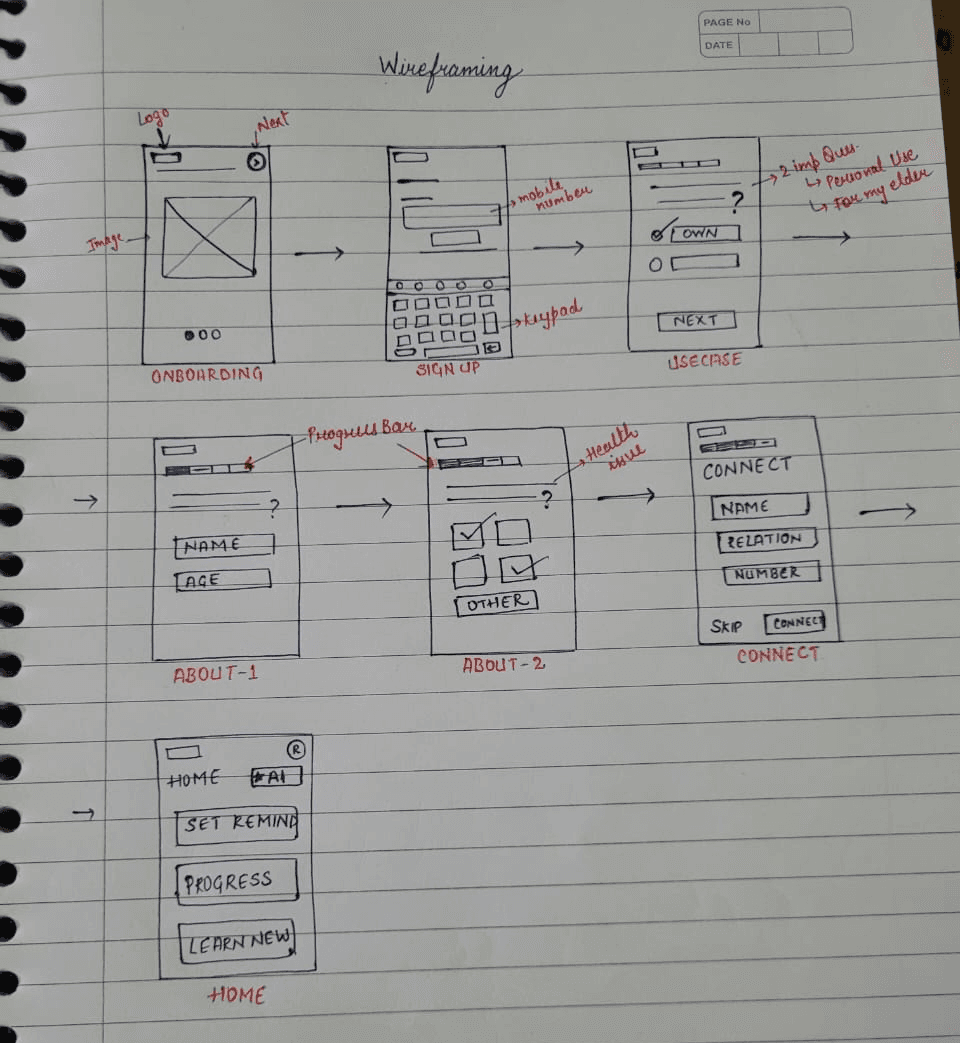
User Flow (For new user)
Encounter the app → download the app → Onboarding screens → signup/login via mobile number → about form (name, age, health issues (if any)) → ??
Wait, wait, wait ….. If my grandpa is not so comfortable and confident with using these kinds of apps, then how they will use this app by themselves …… also, don’t forget the language, we are providing this app for India at first, then we’ll scale it!
Then, we need to give an option before going to About section asking,
For self user or Personal use (those elders who are a bit techie)
For my senior (not so techie)
Again User Flow (For new user)
Encounter the app → download the app → Onboarding screens → signup/login via mobile number → 2 Important questions → about form (name, age, health issues (if any)) → Connect with your loved ones or caregivers with mobile numbers → Home → Walkthrough of the important features → set reminders/ learn something new / get to know about the app / talk to AI assistant (via text or voice).
Wireframing
While working on the wireframes for the smart home app, I approached this as an exploratory phase to outline initial ideas and possibilities. These wireframes serve as a foundation, but I anticipate there may be further adjustments based on user feedback and additional insights as the design evolves.